


Field-initiated Request In 3 Steps
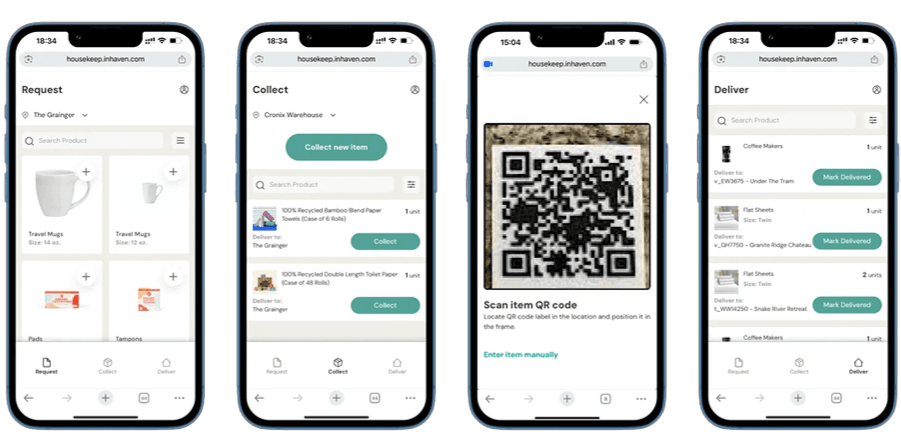
Field teams select items from a pre-approved stock list by property. Each request routes directly as a purchase order for review and approval.
See exactly which items are available to collect and where to deliver them, organized by storage location and property.
Scan product QR codes or search to confirm collection, update inventory, and assign costs to the correct property.
Mark items as delivered to update inventory and trigger accurate owner billing.
Field teams select items from a pre-approved stock list by property. Each request routes directly as a purchase order for review and approval.

See exactly which items are available to collect and where to deliver them, organized by storage location and property.
Scan product QR codes or search to confirm collection, update inventory, and assign costs to the correct property.
Mark items as delivered to update inventory and trigger accurate owner billing.
Benefits of Inhaven’s Inventory Management System
- 1
Easy Access for Field Teams
Web-based access means no app downloads or device limitations for housekeeping teams.
- 2
Replace Fragmented Communication
No more texts, calls, and emails to manage restock requests. Every request flows through one system with full visibility for both field teams and management.
- 3
Prevent Inventory Loss
Every item pulled is scanned, recorded, and tied to a property. Restock needs are captured at the source, in real time.
- 4
Streamline Approvals
Field requests route directly to management as purchase orders for review and approval. No more guessing what was requested or whether it was authorized.


All Part of the Platform
One system. Inventory, field ops, and owner invoicing. All connected.
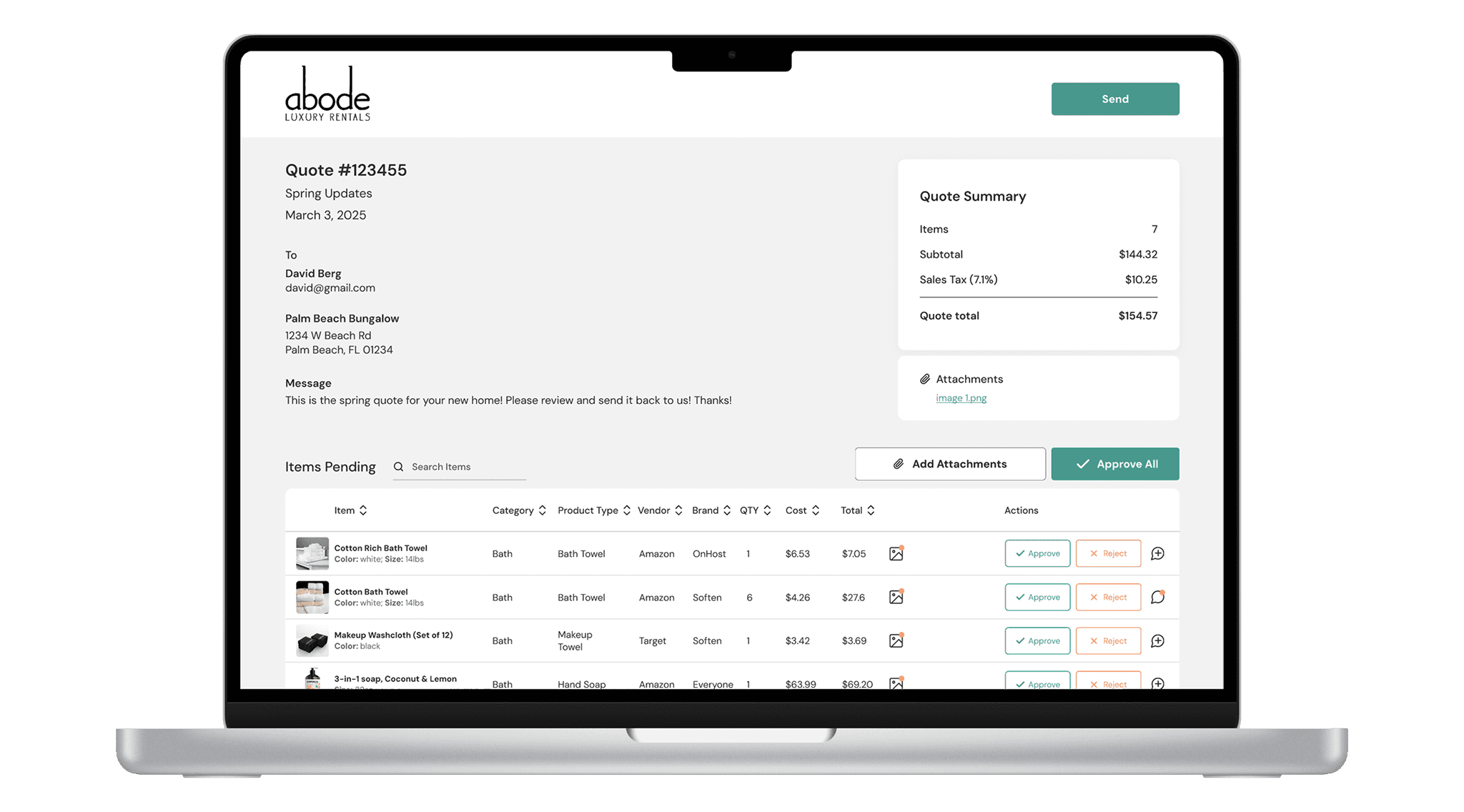
Quoting Tool:Owner Quoting & Markup Control
Generate owner quotes directly from inventory activity or purchase requests.
Create itemized quotes, apply markups, send for owner approval, and adjust pricing or items without restarting the workflow.
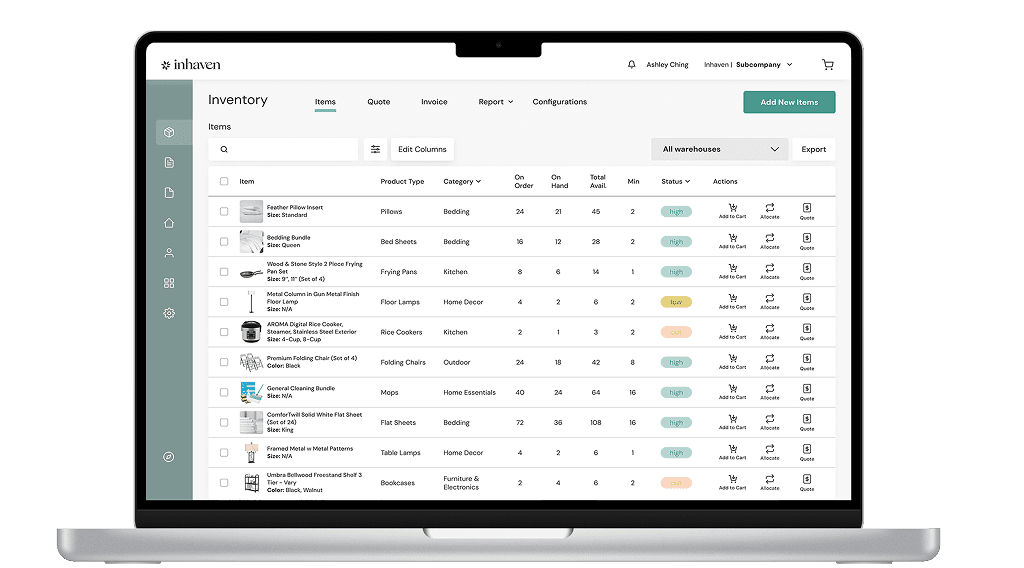
Inventory Management Tool:Automated Inventory Tracking
Track inventory across properties, warehouses, and teams in real time. Set inventory on-hand minimums, monitor stock, and follow items from purchase to delivery with item-level visibility. No spreadsheets. No manual reconciliation. No guessing.
Track products from any brand, not just those purchased through Inhaven.
Our Integration Partners





Why Inhaven?

Wholesale pricing, built in
Average 40% below retail on hospitality-grade linens, amenities, and supplies.

Automated inventory tracking
Reduce shrink. Track products from any brand. Every item is accounted for and billed to the right owner.

Owner quoting & markup control
Turn home supplies from a cost center into a revenue generator, from product recommendations all the way through billing.

Integrated workflows
Seamless PMS connections that eliminates double entry and manual work.

Field-initiated requests
Your teams order what they need. You control what gets approved. Centralized approval keeps standards intact.

Dedicated account manager
Real, actionable support from a single point of contact. No call centers. No runaround.
We are trusted by


Inhaven's innovative system has expanded our possibilities for inventory management, ensuring accuracy and efficiency at every turn.
 JulieImpact Manager, Abode Luxury Rentals
Inhaven has done an outstanding job supporting us in streamlining our process for ordering and purchasing kitchen inventories for each of our locations, while keeping our standards high in our gourmet kitchens.
 StephanieGeneral Manager, Moving Mountain
The quality of the household items they supply to our business is top-notch, and partnering with them has significantly improved our operational efficiencies.
 NataliaOwner of Coastal Carolina Vacations

Inhaven's innovative system has expanded our possibilities for inventory management, ensuring accuracy and efficiency at every turn.
Inhaven has done an outstanding job supporting us in streamlining our process for ordering and purchasing kitchen inventories for each of our locations, while keeping our standards high in our gourmet kitchens.
The quality of the household items they supply to our business is top-notch, and partnering with them has significantly improved our operational efficiencies.
Schedule a Demo
- 1
Tell us about your business and how many properties you have.
- 2
Get a full walkthrough in a 30-minute demo.
- 3
Choose a plan that best fits your portfolio size and needs.
- 4
Manage inventory with confidence.
Frequently Asked Questions
Is there a mobile app for field teams?
Is there a mobile app for field teams?
What if my team isn't tech-savvy?
What if my team isn't tech-savvy?
How many users can I add, and are there different permission levels?
How many users can I add, and are there different permission levels?
Can field teams only request pre-approved items?
Can field teams only request pre-approved items?
How are managers notified when a request is submitted?
How are managers notified when a request is submitted?
Does Housekeep work without Wi-Fi?
Does Housekeep work without Wi-Fi?
What if my field team doesn't speak English?
What if my field team doesn't speak English?